


• Home
  • Agric
  • Sci & Tech
  • Health
  • Environment
  • Hausa News
  • More
    • Business/Banking & Finance
    • Politics/Elections
    • Entertainments & Sports
    • International
    • Investigation
    • Law & Human Rights
    • Africa
    • ACCOUNTABILITY/CORRUPTION
    • Hassan Gimba
    • Column
    • Prof. Jibrin Ibrahim
    • Prof. M.K. Othman
    • Defense/Security
    • Education
    • Energy/Electricity
    • Entertainment/Arts & Sports
    • Society and Lifestyle
    • Food & Agriculture
    • Health & Healthy Living
    • International News
    • Interviews
    • Investigation/Fact-Check
    • Judiciary/Legislature/Law & Human Rights
    • Oil & Gas/Mineral Resources
    • Press Freedom/Media/PR/Journalism
    • General News
    • Presidency
  • About Us
    • Contact Us
    • Board Of Advisory
    • Privacy Policy
    • Ethics Policy
    • Teamwork And Collaboration Policy
    • Fact-Checking Policy
    • Advertising
  • Media OutReach Newswire
    • Wire News
  • The Stories
Facebook Twitter Instagram
Trending
  • Weak cybersecurity threatens Nigeria’s digital payments
  • FG launches 2MW solar project at ADUSTECH
  • Chevron boosts malaria fight across Africa
  • VAT to states surges 30% to N551.8bn in February
  • Sanusi blasts Nigeria’s borrowing spree despite subsidy gains, demands fiscal accountability
  • CBN, NEXIM meet to align strategies to boost non-oil exports, FX earnings
  • Condom prices set to rise 30%
  • Nigerian overnight financing rate: What it means for banks, markets and SMEs, By Kalu Aja
Facebook Twitter Instagram YouTube
AsheNewsAsheNews
  • Home
  • Agric

    Global hunger to stay critical in 2026

    April 24, 2026

    Building resilience locally–small-scale producers and fertilizer [FULL PAPER]

    April 24, 2026

    AFAN Enugu gets new leadership

    April 23, 2026

    Experts call for boost in local snail production

    April 23, 2026

    [EXPLAINER] Bottled water under the microscope: Why some brands stand out

    April 23, 2026
  • Sci & Tech

    Weak cybersecurity threatens Nigeria’s digital payments

    April 24, 2026

    Global fish growth declines over the last century

    April 24, 2026

    GIGM unveils integrated mobility platform

    April 23, 2026

    Airtel Africa launches DigiLeap tech drive for young women

    April 23, 2026

    CITAD urges more girls in tech

    April 23, 2026
  • Health

    Chevron boosts malaria fight across Africa

    April 24, 2026

    Condom prices set to rise 30%

    April 24, 2026

    HPV, malaria vaccines save lives across Africa

    April 24, 2026

    Group urges Nigerians to choose heart-healthy foods

    April 23, 2026

    Lagos trains officers to boost health surveillance

    April 23, 2026
  • Environment

    Lagos cracks down on E-waste

    April 23, 2026

    Nigeria achieves 91% aviation safety rating

    April 23, 2026

    FG seeks $516m external financing for Sokoto–Badagry superhighway

    April 23, 2026

    NGE warns NBC over sanction threat

    April 22, 2026

    Don urges geographers to tackle forest crisis

    April 21, 2026
  • Hausa News

    Otti plans 250-room 5-star hotel in Umuahia

    April 11, 2026

    Anti-quackery task force seals 4 fake hospitals in Rivers

    August 29, 2025

    [BIDIYO] Yadda na lashe gasa ta duniya a fannin Ingilishi – Rukayya ‘yar shekara 17

    August 6, 2025

    A Saka Baki, A Sasanta Saɓani Tsakanin ‘Yanjarida Da Liman, Daga Muhammad Sajo

    May 21, 2025

    Dan majalisa ya raba kayan miliyoyi a Funtuwa da Dandume

    March 18, 2025
  • More
    1. Business/Banking & Finance
    2. Politics/Elections
    3. Entertainments & Sports
    4. International
    5. Investigation
    6. Law & Human Rights
    7. Africa
    8. ACCOUNTABILITY/CORRUPTION
    9. Hassan Gimba
    10. Column
    11. Prof. Jibrin Ibrahim
    12. Prof. M.K. Othman
    13. Defense/Security
    14. Education
    15. Energy/Electricity
    16. Entertainment/Arts & Sports
    17. Society and Lifestyle
    18. Food & Agriculture
    19. Health & Healthy Living
    20. International News
    21. Interviews
    22. Investigation/Fact-Check
    23. Judiciary/Legislature/Law & Human Rights
    24. Oil & Gas/Mineral Resources
    25. Press Freedom/Media/PR/Journalism
    26. General News
    27. Presidency
    Featured
    Recent

    Weak cybersecurity threatens Nigeria’s digital payments

    April 24, 2026

    FG launches 2MW solar project at ADUSTECH

    April 24, 2026

    Chevron boosts malaria fight across Africa

    April 24, 2026
  • About Us
    1. Contact Us
    2. Board Of Advisory
    3. Privacy Policy
    4. Ethics Policy
    5. Teamwork And Collaboration Policy
    6. Fact-Checking Policy
    7. Advertising
    Featured
    Recent

    Weak cybersecurity threatens Nigeria’s digital payments

    April 24, 2026

    FG launches 2MW solar project at ADUSTECH

    April 24, 2026

    Chevron boosts malaria fight across Africa

    April 24, 2026
  • Media OutReach Newswire
    • Wire News
  • The Stories
AsheNewsAsheNews
Home»Science/Tech & Innovation/R&D»How to find your Windows 11 product key with 3 easy methods
Science/Tech & Innovation/R&D

How to find your Windows 11 product key with 3 easy methods

Abdallah el-KurebeBy Abdallah el-KurebeDecember 26, 2024No Comments4 Mins Read
Windows 11
Share
Facebook Twitter LinkedIn Pinterest Email

Finding the physical location of your Windows 11 product key can be a hassle unless you use several simple commands.

The physical location of your Windows product key is often located on a sticker placed in difficult-to-reach spots on your PC. However, with a few commands and a little know-how, you can use the operating system to reveal your Windows 11 product key. The techniques for finding a product key are practically the same as those for Windows 10, but there are subtle differences.

This tutorial explains how to find your Windows 11 product key using the operating system and not by relying on the sticker placed haphazardly somewhere on your PC.

3 simple ways to find your Windows 11 product key

These techniques are best used for Windows 11 computers running the OS since purchase or for Windows 10 PCs upgraded to Windows 11 through the patch process. The product keys for enterprise PCs are distributed differently and may not be revealed using these methods.

1. Use the command prompt in Windows 11

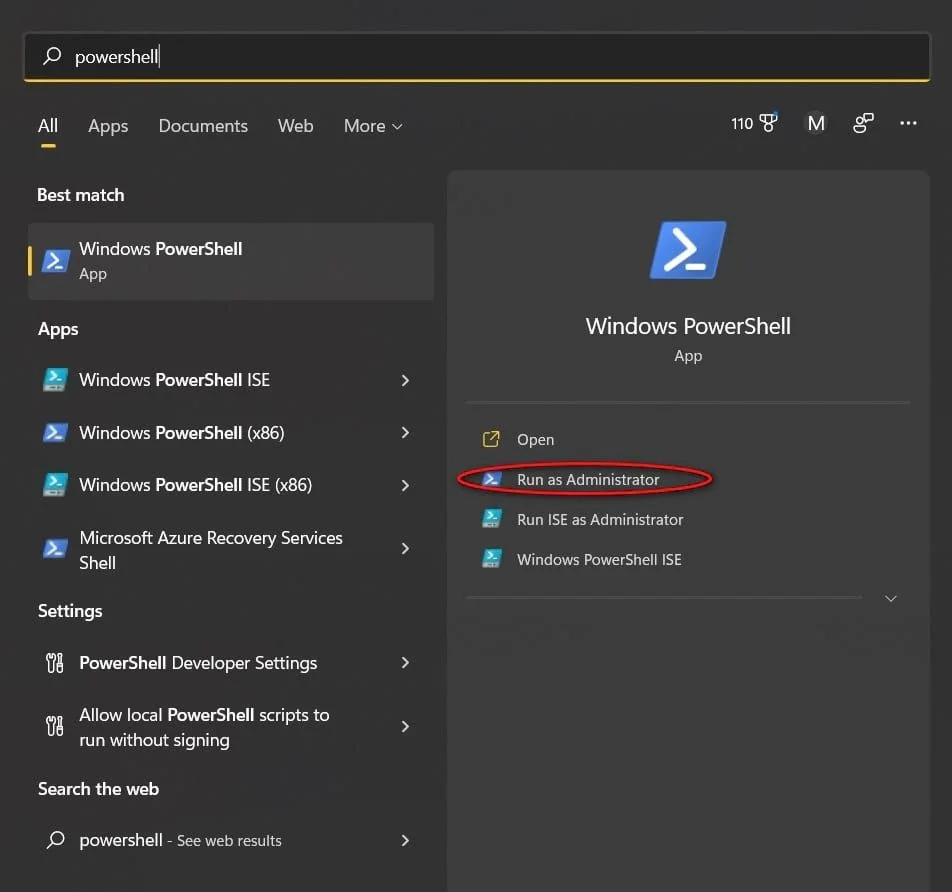
The most direct method for finding your Windows 11 product key is from the command line. Open the Windows 11 search tool and type “command.” Find the command prompt in the search results and click the Run As Administrator link to reach the command prompt screen. You can also reach the command prompt using the keyboard combination Windows Key-R and typing “cmd” into the resulting text box.
Type or paste this command at the prompt and press the Enter key:

wmic path softwareLicensingService get OA3xOriginalProductKey

The command reveals your original Windows 11 product key on the command prompt screen.

2. Use PowerShell in Windows 11

If you would prefer to use PowerShell, the process is similar, but the commands are different. Open the Windows 11 search tool and type “powershell.” Find PowerShell in the search results and click the Run As Administrator link.

At the PowerShell prompt, type or paste this command, then press Enter:

powershell "(Get-WmiObject -query ‘select * from

SoftwareLicensingService’).OA3xOriginalProductKey"

The command reveals your original Windows 11 product key on the PowerShell prompt screen.

3. Use the Registry file in Windows 11

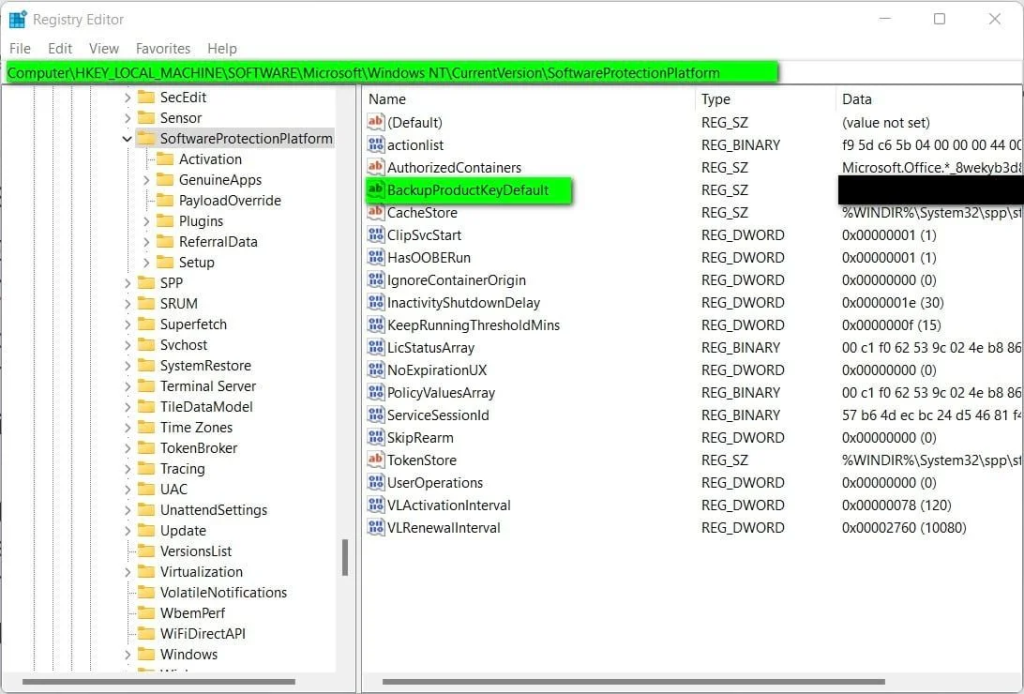
The Windows 11 product key is stored in the Windows Registry file, so it is possible to find the product key there if you navigate to the right place. Open the Windows 11 search tool and type “regedit.” Select the Registry Editor application from the results and click the Run As Administrator link. Using the left-hand windowpane in the editor, navigate to this key:

Computer\HKEY_LOCAL_MACHINE\SOFTWARE\Microsoft\Windows NT\CurrentVersion\SoftwareProtectionPlatform

The figure below shows that the BackupProductKeyDefault key will reveal a valid Windows 11 product key.

Note: This key may differ from the key revealed by the command prompt or PowerShell.
Exit out of the Registry Editor when you are finished.

Additional tips about finding your Windows 11 product key

Some third-party vendors offer applications to locate and display your Windows 11 product key. Still, the techniques explained above suggest that those apps may not be worth the trouble or the potential security issues, given you can already find the product key by yourself using your device.

Remember that if you bought Windows 11 from the Microsoft Store, your account order history will have product key information. If Windows came pre-installed on your device via an OEM or retailer, your system should come with a digital license, meaning your product key should not be required at all.

However, regardless of how you purchased Windows 11, the key will always follow the same familiar, 25-character alphanumeric code format.

By Mark W. Kaelin, who has been writing and editing stories about the information technology industry, software, hardware, gaming, finance, accounting, and technology geekdom for more than 30 years.

TechRepublic

Product Key Windows 11
Share. Facebook Twitter Pinterest LinkedIn WhatsApp Reddit Tumblr Email
Abdallah el-Kurebe
  • Website
  • Facebook
  • Twitter
  • LinkedIn

Related Posts

Weak cybersecurity threatens Nigeria’s digital payments

April 24, 2026

Global fish growth declines over the last century

April 24, 2026

GIGM unveils integrated mobility platform

April 23, 2026

Leave A Reply Cancel Reply

Weak cybersecurity threatens Nigeria’s digital payments

April 24, 2026

FG launches 2MW solar project at ADUSTECH

April 24, 2026

Chevron boosts malaria fight across Africa

April 24, 2026

VAT to states surges 30% to N551.8bn in February

April 24, 2026
About Us
About Us

ASHENEWS (AsheNewsDaily.com), published by PenPlus Online Media Publishers, is an independent online newspaper. We report development news, especially on Agriculture, Science, Health and Environment as they affect the under-reported rural and urban poor.

We also conduct investigations, especially in the areas of ASHE, as well as other general interests, including corruption, human rights, illicit financial flows, and politics.

Contact Info:
  • 1st floor, Dogon Daji House, No. 5, Maiduguri Road, Sokoto
  • +234(0)7031140009
  • ashenewsdaily@gmail.com
Facebook Twitter Instagram Pinterest
© 2026 All Rights Reserved. ASHENEWS Daily Designed & Managed By DeedsTech

Type above and press Enter to search. Press Esc to cancel.